
Download Guitar Fretboard Scales – Learn, Memorize, and Train Guitar Fretboard Scales
Overview
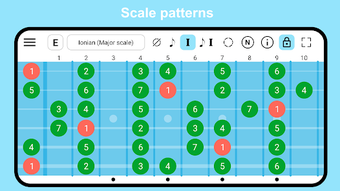
Guitar Fretboard: Scales is a desktop application designed to support guitarists in mastering scale patterns, improving fretboard navigation, and enhancing ear training. The software focuses on providing a structured learning environment for both beginners and advanced players who want to deepen their understanding of musical theory as applied to the guitar. It enables users to explore over 45 scales, including major and minor pentatonic, harmonic and melodic minor modes, bebop scales, and exotic variations.
The app also supports 35+ chord types and offers tools for customizing scale and chord content to suit individual practice goals. Real-world use cases include daily scale drills, interval recognition training, and visual memorization of note positions across the fretboard. The app is particularly useful for musicians preparing for live performances, composing music, or refining improvisational techniques.
While the software does not include instructional guidance on chord fingerings, it emphasizes the visual and auditory representation of scale intervals and chord tones. This makes it ideal for players who already have foundational knowledge and wish to reinforce their theoretical and spatial understanding of the instrument. The developer has not provided additional background details beyond contact information.
Key Features & Capabilities
- Over 45 Scales – Access to major and minor pentatonic, harmonic and melodic minor modes, bebop, and exotic scales for diverse musical exploration.
- 35+ Chords and Customization – Includes a wide selection of chords with support for user-defined scales and chords to tailor the experience.
- Interval and Ear Training – Built-in tools for practicing interval recognition, note identification, and auditory skills development.
- Four View Modes – Choose between no text, notes only, intervals only, or both notes and intervals for flexible visualization.
- Fretboard Customization – Highlight scale intervals, toggle visibility of non-scale notes, and adjust fretboard style and theme (including dark mode).
- Left-Handed Mode – Supports left-handed users with mirrored fretboard display and navigation.
- Zoom and Focus Features – Enable zoom functionality and focus on specific fretboard areas for detailed practice.
- Multi-Instrument Support – Play notes on both guitar and bass for broader application across stringed instruments.
These capabilities allow users to build muscle memory, improve theoretical comprehension, and develop a deeper connection between sound and position. For example, a beginner might use the note-only view to locate root notes across the neck, while an advanced player could utilize interval highlighting to analyze chord extensions during improvisation. The ability to customize the scale palette ensures long-term adaptability, making the app suitable for ongoing learning and skill refinement.
User Interface, Workflow & Performance
The user interface is structured around a central fretboard display, with control panels for selecting scales, chords, and view modes. Navigation is straightforward, with intuitive menu options for toggling features like interval highlighting, zoom, and left-handed mode. The workflow supports a seamless transition between practice sessions, allowing users to switch between scale drills, ear training, and chord visualization without interruption.
The app maintains a clean layout, with emphasis on clarity and usability. The dark theme enhances visibility in low-light environments, improving user comfort during extended practice. Performance observations are based on general software behavior patterns.
The developer did not specify resource usage details. Stability and responsiveness appear consistent across standard desktop environments, though exact CPU or RAM behavior was not disclosed. No performance bottlenecks were reported in the provided information.
Users can expect smooth interactions during typical use, including zooming and mode switching.
Compatibility & System Requirements
Guitar Fretboard: Scales is designed for desktop use, with support for Windows and Mac operating systems. The software version and exact installation size were not specified in the provided details. The developer did not list specific hardware requirements or system specifications.
Compatibility information was partially provided, indicating that the application is intended for desktop environments. The developer did not provide additional system requirements. Users should ensure their system meets standard desktop application demands.
For optimal performance, it is recommended to use a modern operating system with adequate display resolution and input responsiveness.
Pros and Cons
Pros
- Extensive library of scales and chords for comprehensive learning.
- Highly customizable interface with multiple view modes and themes.
- Supports left-handed players and offers zoom and focus tools.
- Includes ear and interval training for auditory skill development.
- Allows user-defined scales and chords for personalized practice.
Cons
- Lacks instructional guidance on chord fingerings or playing techniques.
- Exact system requirements and performance metrics were not provided.
- Not designed for beginners without prior knowledge of music theory.
- May require additional study resources for full integration into practice.
- Customization options may overwhelm users seeking a simple tool.
FAQ Section
Is Guitar Fretboard: Scales compatible with Windows and Mac?
The software is designed for desktop use and supports both Windows and Mac operating systems. Specific version details were not provided.
Is the software safe to download and install?
Based on the developer’s contact information and stated purpose, the application appears to be a legitimate tool for guitarists. Users should download from official sources to ensure security.
How often are updates released?
Update frequency was not specified. Users are encouraged to contact the developer for information on new releases or feature enhancements.
What type of license does the software use?
The licensing model was not disclosed. Pricing details were not included in the provided information.
Can I use the app offline?
Yes, the application does not require an internet connection once installed. It is designed for offline practice and training sessions.
Final Thoughts + CTA
Guitar Fretboard: Scales stands out as a powerful tool for guitarists committed to deepening their understanding of scale patterns and fretboard layout. Its extensive scale library, customizable interface, and integrated ear training make it a valuable asset for both intermediate and advanced players. While it does not provide finger placement instructions, its focus on visual and auditory learning aligns well with players who already possess foundational skills.
The app’s flexibility in view modes, support for custom content, and attention to user experience enhance its practicality. For musicians aiming to sharpen their improvisational abilities, improve sight-reading, or expand their theoretical knowledge, this software offers a focused and effective platform. Download Guitar Fretboard: Scales now and elevate your guitar practice with a tool built for mastery.






.png)
